Marketing
Picsaurus vs AirDrop: Which Is Better for Sharing Tour Photos?
When it comes to sharing tour photos, AirDrop may seem convenient—but Picsaurus offers a more organized, guest-friendly solution for tour businesses.


Taking great tour photos is easy.
Getting those photos into guests' hands is where things often get complicated.
Many tour operators start with AirDrop because it's already on their phone. It's fast, free, and works surprisingly well when you're standing next to a guest at the end of a tour.
But what happens when half the group uses Android?
What happens when guests leave early?
What happens when you want guests to leave reviews, share your brand online, or access their photos days later?
That's where operators often discover that AirDrop and a dedicated photo-sharing platform like Picsaurus are solving two very different problems.
This guide takes a practical, real-world look at both options so you can decide which is the better fit for your operation.
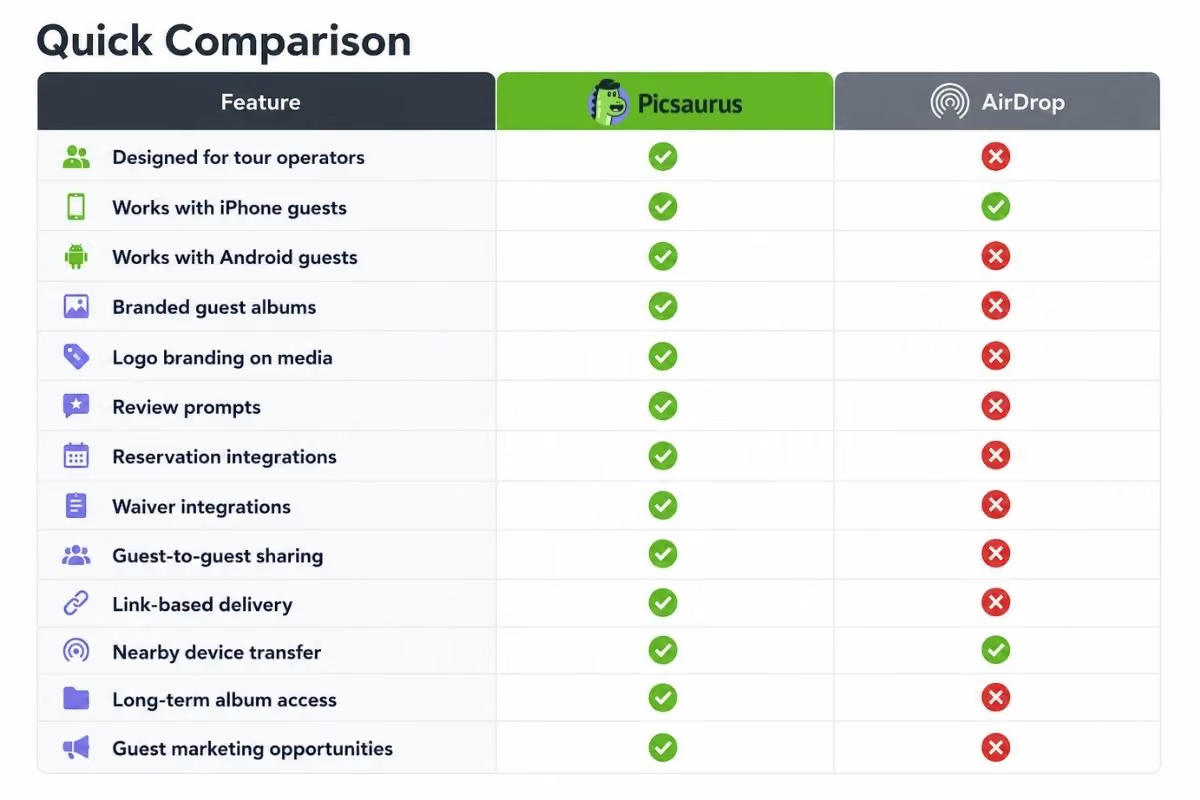
Key Takeaways
AirDrop is one of the best one to one file-sharing tools created (for Apple devices only).
For quick transfers between nearby Apple devices, it's hard to beat.
But that's not the same job as managing photo delivery for a tour business.
Once you're dealing with larger groups, Android users, review generation, branded experiences, content collection, and operational efficiency, the comparison changes.
AirDrop remains an excellent tool for spontaneous sharing in the field.
Picsaurus is better viewed as a guest experience platform that happens to deliver photos.
If your goal is simply moving files from one phone to another, AirDrop is a great choice.
If your goal is turning photo sharing into a professional, branded part of the guest journey while reducing work for your team, Picsaurus is the stronger fit.
The key question is simple:
Are you transferring photos, or are you creating an experience around them?
What Each Platform Is Designed For
Before comparing features, it's important to understand the purpose behind each tool.
What AirDrop Is Designed For
AirDrop was created by Apple to quickly transfer files between nearby Apple devices.
It works exceptionally well for:
- Sending a few photos
- Sharing files with nearby people
- Quick transfers between Apple devices
- One-off sharing situations
AirDrop was never designed to manage tour photo delivery.
It wasn't built for:
- Tour groups
- Review generation
- Branded experiences
- Marketing workflows
- Automated guest communication
And that's perfectly okay.
It's simply solving a different problem.
What Picsaurus Is Designed For
Picsaurus was built specifically for tour, activity, and experience operators who regularly share photos and videos with guests. It focuses on helping operators deliver branded trip media, create professional guest experiences, collect marketing content, generate reviews, and reduce guide administration.
Rather than acting as a file transfer tool, it acts as part of the guest experience.
The platform is designed around questions operators ask every day:
- How do I get photos to all guests?
- How do I avoid manual admin?
- How do I encourage reviews?
- How do I collect content for marketing?
- How do I make sharing simple for guides?
A Real-World Tour Scenario
The easiest way to compare these tools is to look at a realistic tour day.
Scenario 1: One Guest, One Photo
Your guide takes a great photo of a guest during a kayak tour.
The guest wants it immediately.
The guest has an iPhone.
The guide has an iPhone.
AirDrop Wins
This is exactly what AirDrop was built for.
The transfer takes seconds.
No uploads.
No links.
No setup.
No waiting.
For this use case, AirDrop is excellent.
Scenario 2: A Full Tour Group
Now imagine a different situation.
Your food tour that has:
- 11 guests
- 7 iPhone users
- 4 Android users
- 2 families that booked together
- Several guests leaving immediately after the tour
Your guide has 150 photos and videos from the day.
Now what?
AirDrop Starts Creating Friction
The guide needs to:
- Find each guest individually
- Ensure they're nearby
- Confirm Wi-Fi and Bluetooth are enabled
- Transfer files multiple times
- Find another solution for Android users
- Send media the next day to Android users (if they remember)
- Repeat the process every tour
Even when AirDrop works perfectly, it can become time-consuming when multiplied across hundreds or thousands of guests each season.
This Is Where Picsaurus Fits Better
Instead of individual transfers, guests automatically receive access to a branded album experience.
Guests can access content later.
Device type becomes irrelevant.
The sharing process continues even after everyone has gone home.
The Hidden Cost of "Free"
One reason operators use AirDrop is obvious.
It's free.
And for many small operators, that's a reasonable starting point.
But it's worth asking a different question:
What is your guide's time worth?
Imagine a guide spends:
- 10 minutes after every tour sharing photos
- 4 tours per day
- 5 days per week
That's more than 16 hours every month spent managing photo delivery.
Suddenly the conversation isn't just about software costs.
It's about operational efficiency.
Many operators eventually realize that the biggest expense isn't technology.
It's repetitive manual work.
Strengths of AirDrop
A fair comparison should acknowledge where AirDrop shines.
Extremely Fast
For nearby Apple users, few tools are faster.
No Internet Required
Transfers happen directly between devices.
Familiar to Apple Users
Most iPhone owners already know how it works.
No Additional Software
No setup required.
No accounts.
No training.
Great for One-Off Sharing
If sharing photos is occasional rather than central to your guest experience, AirDrop may be enough.
Strengths of Picsaurus
Picsaurus becomes more valuable when photo sharing is a regular part of your operation.
Built Around Tour Workflows
Many operators begin with consumer tools before realizing tourism has unique requirements.
Tours involve:
- Multiple guests
- Different devices
- Repeat departures
- Seasonal staff
- Limited admin time
Picsaurus is built around these realities rather than general file sharing.
Branded Guest Experience
Most sharing methods remove your brand from the experience.
A guest receives a generic file transfer and quickly forgets where the content came from.
Picsaurus keeps the operator visible throughout the sharing process through branded media and branded album experiences.
Review Opportunities
Photos arrive when guests are feeling their highest level of excitement.
That's the same moment many operators want to encourage reviews and sharing.
Review prompts are part of the Picsaurus workflow rather than an afterthought.
Marketing Content Collection
One challenge operators consistently face is finding fresh content.
Guides may not always capture enough media.
Guests often take amazing photos that never make it back to the business.
Picsaurus includes guest-sharing workflows designed to help operators collect authentic content from guests for future marketing.
Reduced Guide Workload
Guides should focus on:
- Safety
- Storytelling
- Guest experience
Not copying files between devices all day.
Reducing administrative work and user driven marketing are the biggest benefits operators report from moving beyond manual sharing methods.
The Android Problem
This is one of the biggest operational differences.
AirDrop is an Apple feature.
Tour groups are not Apple-only.
Even operators with mostly iPhone guests often encounter:
- Android users
- International travelers
- Mixed-device families
- Groups using different operating systems
As soon as that happens, guides usually need a second sharing process.
That often means:
- Dropbox
- Google Drive
- Text messages
Now the team is managing multiple workflows.
Picsaurus avoids this issue by using link-based sharing rather than device-specific transfers.
Everyone receives the same experience.
Which Is Better for Different Types of Operators?
Choose AirDrop If:
- You occasionally share photos
- All guests use iPhones
- You only need one-to-one transfers
- You don't need branding
- You don't need review generation
- You don't need marketing content collection
- You prefer a completely free solution
For small operations, AirDrop may be all you need.
Choose Picsaurus If:
- Photos are part of your guest experience
- You share media regularly
- You serve both iPhone and Android guests
- You want branded photo delivery
- You want review opportunities built into the process
- You want guests sharing your brand online
- You want authentic content for marketing
- You want less guide administration
- You want reservation and waiver integrations
- You want a more professional sharing experience
Pros and Cons
AirDrop
Pros
- Free
- Fast
- No setup
- Excellent for Apple-to-Apple transfers
- Works without internet
Cons
- Apple-only
- Requires proximity
- Not designed for tour operations
- No branding
- No review generation
- No automation
- No guest follow-up experience
Picsaurus
Pros
- Built for tour operators
- Supports mixed-device groups
- Branded guest experience
- Review opportunities
- Marketing content collection
- Reservation and waiver integrations
- Less manual guide work
- Supports long-term guest access
- Designed for operators who regularly share media
Cons
- More setup than AirDrop