Marketing
Picsaurus vs Google Drive vs Dropbox: When Storage Stops Being Enough
Your guests don't remember where photos were stored. They remember how easy they were to receive.

Google Drive and Dropbox are two of the most popular file storage platforms in the world.
There's a good chance your business already uses one of them.
They're familiar. They're reliable. And they're excellent at what they were built to do.
Store files.
But tour operators don't just need somewhere to store photos.
They need a way to get those photos to guests.
And that's where the conversation changes.
The real question isn't:
"Where should we store our photos?"
It's:
"How should we deliver photos to guests without creating more work for our team?"
For many operators, that distinction becomes increasingly important as bookings grow.
Let's take a closer look at where Google Drive and Dropbox fit, where they fall short, and why some operators eventually move to purpose-built photo-sharing platforms like Picsaurus.
Key Takeaways
Google Drive and Dropbox are excellent storage platforms.
If your goal is simply storing photos and occasionally sharing links, either tool can work well.
But many operators eventually discover that storage is only one part of the job.
The harder part is delivering photos to guests consistently, professionally, and without creating more work for guides and office staff.
That's where dedicated tourism platforms begin to separate themselves.
Google Drive and Dropbox answer the question:
"Where should we keep our files?"
Picsaurus answers the question:
"How do we turn photo sharing into part of the guest experience?"
If storage is your primary need, stick with Google Drive or Dropbox.
If guest delivery, reviews, branding, marketing content, and operational efficiency are becoming priorities, that's when storage alone may stop being enough.
Understanding the Real Difference
Most comparison articles start with features.
Let's start with workflows instead.
Because that's where tour operators feel the difference.
Google Drive and Dropbox are storage platforms.
Picsaurus is a guest photo-sharing platform built specifically for tour, activity, and experience operators.
Those sound similar.
In practice, they're solving very different problems.
The Tour Photo Workflow Test
Imagine it's 5:30 PM.
Your final zipline tour has just returned.
The guide has 200 photos and videos from the day.
Ten guests are asking how they'll receive them.
Tomorrow's tours are already fully booked.
What happens next?
Let's walk through the workflow.
Step 1: Store the Photos
Google Drive and Dropbox
This is their strength.
Create folders.
Organize media.
Upload files.
Store everything securely.
Simple.
Picsaurus
Photos are stored within trip-based albums that were automatically created. The albums are connected to your reservation data.
The goal isn't simply storage.
The goal is preparing media for seamless guest delivery.
Winner: Picsaurus
Albums are automatically created with guest data.
Step 2: Get Photos to Guests
This is where things start changing.
Google Drive and Dropbox Workflow
Typically someone needs to:
- Create a folder
- Upload photos
- Generate a sharing link
- Collect guest contact information
- Send the link
- Answer guest questions later
It works.
Thousands of operators do exactly this.
But it's entirely manual and slow.
Picsaurus Workflow
Photos are automatically delivered to guests.
Picsaurus is connected to your reservation system or digital waiver. Trip and guest information is passed through so the right tour album is automatically created. All guests from that trip automatically get their photo delivered to them.
Instead of treating sharing as an extra task, sharing becomes automatic.
Winner: Picsaurus
Not because it stores files better.
Because it delivers them better.
Step 3: Brand the Experience
Here's something many operators don't think about initially.
When guests receive photos through a cloud storage folder, whose experience is it?
Google's.
Dropbox's.
Not yours.
The photos are yours.
The delivery experience isn't.
Google Drive and Dropbox
Guests receive:
- Generic file links
- Generic folder interfaces
- Generic download experiences
Your brand largely disappears.
Picsaurus
The platform is designed around branded guest albums and branded media sharing.
Guests continue interacting with your business rather than a storage provider. Their friends and family interact with your brand across platforms. Everyone knows who their friends went with.
For operators focused on professionalism and guest experience, this can be an important distinction.
Step 4: Generate Reviews
This is where most manual photo workflows completely break down.
The best moment to ask for a review is often shortly after an amazing experience.
That's usually the same moment guests are looking at their photos.
Cloud Storage Approach
The team must:
- Send a review email separately
- Ask guides to remind guests
- Run a different follow-up process
Everything happens independently.
Picsaurus Approach
Review opportunities are incorporated into the photo-sharing journey itself.
The experience becomes connected rather than fragmented and reviews go up as a result.
Step 5: Create Marketing Value
Many operators start sharing photos simply to make guests happy.
Then something interesting happens.
They realize those photos have marketing value too.
The challenge is that guest-generated content is surprisingly difficult to collect consistently.
Guides are busy.
Guests forget to send photos.
Great content gets lost.
Google Drive and Dropbox
Storage exists.
The content collection process does not.
Operators still need separate systems for:
- Gathering content
- Organizing content
- Managing permissions
- Finding usable media later
Picsaurus
The platform is designed to help operators build a library of marketing content while simultaneously delivering photos to guests.
The same workflow serves both purposes.
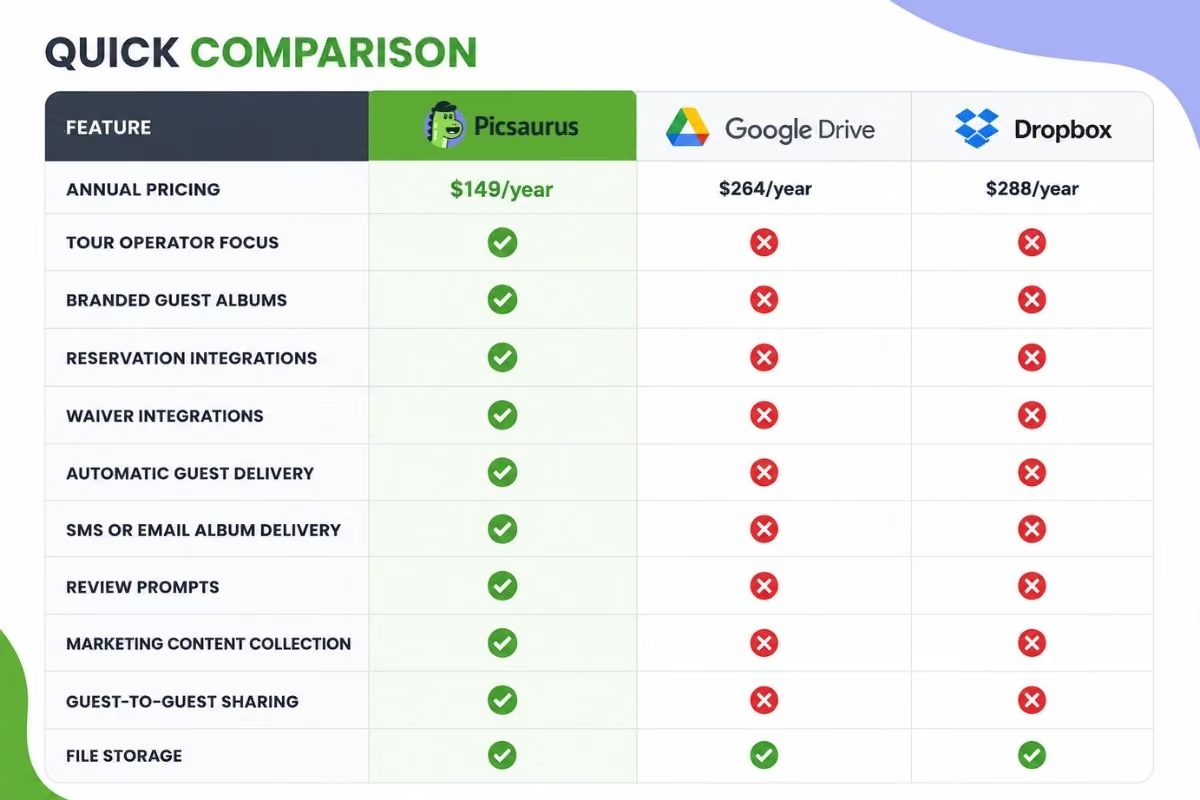
Annual Pricing Comparison
Pricing matters.
But context matters too.
The cheapest tool isn't always the lowest-cost solution.
Where annual pricing is publicly available, it is shown below.
Platform
Annual Pricing
Picsaurus
$149/year
Google Drive
$264/year
Dropbox
$288/year
If pricing is not publicly available or varies significantly by storage requirements and plan type, it is left blank.
When evaluating cost, it's worth asking:
How much time does your team spend every week managing photo delivery?
Software costs are easy to measure.
Administrative costs are often hidden.
When Google Drive Is the Right Choice
Google Drive is a great fit if:
- You primarily need storage
- Photo sharing is occasional
- You already use Google Workspace
- Your guest volume is relatively low
- Manual processes are acceptable
For many smaller operators, Drive works perfectly well.
There's no need to overcomplicate things.
When Dropbox or Google Drive Is the Right Choice
Dropbox remains a strong option if:
- Your team already uses Dropbox
- File organization is your main concern
- Staff collaboration across different files is more important than guest engagement
Like Google Drive, Dropbox solves the storage problem extremely well.
When Picsaurus Becomes the Better Fit
Most operators don't switch because they run out of storage.
They switch because they run out of time.
The more tours you run, the more guests you serve, and the more photos you share, the more valuable automation becomes.
Picsaurus is often a better fit when:
- Photos are part of your guest experience
- You regularly share media with guests
- You want branded delivery
- You want more reviews
- You need marketing content
- You want guides focused on guiding instead of file management
- You want sharing integrated into operations
Picsaurus
Pros
- Built for tour operators
- Branded guest albums
- Review opportunities
- Marketing content collection
- Reservation and waiver integrations
- Less guide administration
- Guide tipping built in
Cons
- More specialized than general storage tools
Google Drive
Pros
- Familiar
- Reliable
- Excellent file storage
- Strong collaboration tools
Cons
- Manual guest delivery
- No tourism-specific functionality
- No built-in review workflow
- No branded guest experience
Dropbox
Pros
- Reliable syncing
- Excellent file storage
- Mature platform
- Strong team collaboration
Cons
- Manual guest workflows
- No tourism-specific features
- No built-in guest engagement tools